The Toolbox
A tour of the tools this book has used in passing since Base Camp — GHC, GHCi, Cabal, Stack, Hoogle, HLS — tied together into one map of what each one is actually for.
Base Camp introduced GHCup and ghci just enough to get the rest of this book running hands-on. This closing chapter fills in the rest of the map.
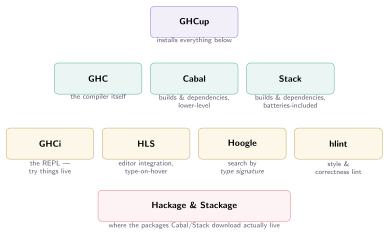
Figure: Every tool here answers one specific question. GHCup installs the rest; GHC compiles; Cabal and Stack manage dependencies and builds; GHCi, HLS, Hoogle, and hlint are what you reach for constantly while actually writing code.
GHC and GHCi, properly
GHC (the Glasgow Haskell Compiler) is the thing that actually turns .hs files into running programs — every other tool in this chapter either wraps it, feeds it, or queries it. ghci, its interactive REPL, is worth knowing beyond the handful of commands Base Camp introduced:
ghci> :type map            -- ask for a value's type
map :: (a -> b) -> [a] -> [b]

ghci> :kind Maybe           -- ask for a type's kind
Maybe :: * -> *

ghci> :info Functor         -- full details: methods, laws, instances in scope
ghci> :load MyModule.hs     -- load a file (:l for short)
ghci> :reload               -- reload after editing (:r for short)
ghci> :set -XLambdaCase     -- turn on an extension for this session only
:type and :kind are the two commands worth building a habit around — reaching for :type someExpression the instant a type signature is unclear is faster and more reliable than working it out on paper, and it’s the single most common way experienced Haskell programmers actually explore unfamiliar code.
Cabal and Stack: two answers to “manage my dependencies”
Both Cabal and Stack solve the same core problem — pin down exactly which package versions a project depends on, fetch them, and build against them reproducibly — with different philosophies:
- Cabal is the more fundamental, lower-level tool (and the one GHCup installs by default): you declare dependencies and version bounds in a
.cabalfile, and Cabal resolves a compatible set from Hackage directly. - Stack builds on top of the same underlying tools but resolves dependencies against curated snapshots (Stackage) — large, pre-tested sets of package versions known to build together — trading some flexibility for a stronger “if it builds for me, it builds for you” guarantee.
Cabal’s dependency resolution has, at times, been infamous for producing version conflicts unresolvable without manual constraint tweaking — a reputation “Cabal hell” earned years ago and one modern Cabal (with proper version bounds and, ideally, a cabal.project.freeze file) has substantially outgrown. Stack’s curated-snapshot approach sidesteps the problem by construction, which is part of why teams that got burned early on still often default to Stack out of habit, even on codebases where modern Cabal would work just as well today.
cabal init                # start a new project
cabal build                # build it
cabal run                  # build and run
cabal repl                 # ghci, with the project's dependencies loaded

stack new my-project       # start a new project (from a template)
stack build
stack run
stack ghci
Where Cabal’s per-project pinning lives in a .cabal file’s version bounds, Stack’s lives in a stack.yaml file that every stack new-created project gets automatically:
# stack.yaml
resolver: lts-22.28   # one Stackage snapshot: a specific, tested GHC + package-version set

packages:
  - .                 # this project's own package

extra-deps:
  - some-package-1.2.3   # a dependency not in the chosen snapshot, pinned by hand
The resolver line is the whole idea in one place: lts-22.28 names one specific, dated, already-tested combination of a GHC version and thousands of package versions known to build together. Every developer on a project pointed at the same resolver gets the exact same dependency versions, with no solver run needed at all for anything already in the snapshot — Stack only has to resolve versions itself for the rare package listed under extra-deps, ones the curators haven’t included.
Stackage — the snapshot source Stack’s resolver field points to — comes in two flavors: LTS (Long Term Support) snapshots, numbered and updated periodically with only backward-compatible package updates, meant to be stable upgrade targets over months; and nightly snapshots, rebuilt daily against the latest package versions, favoring currency over stability. Most real projects pin to an LTS resolver and upgrade deliberately, snapshot by snapshot, rather than floating on nightly.
Neither is objectively correct; both are genuinely popular, and most Haskell developers develop a preference within their first few projects and mostly stick with it.
Hoogle: search by type, not just by name
Hoogle is the tool that most distinguishes searching for Haskell code from searching for code in most other languages: because every function’s type signature is precise and meaningful (the whole premise of Chapter 4’s Types chapter), Hoogle lets you search by type signature directly, not just by name.
Search: (a -> b) -> [a] -> [b]
That exact query returns map as the very first result — and more usefully, searching String -> [String] when you don’t yet know the function you want turns up lines and words immediately, without needing to know their names in advance. Hoogle is genuinely one of the most-used everyday Haskell tools precisely because “I know the shape of the function I need, but not its name” is an extremely common situation once type signatures are second nature.
Hoogle also works entirely offline and locally, installable as its own package (cabal install hoogle), pre-indexed against exactly the packages a given project depends on — useful for searching a large private codebase’s own functions by type, not just public Hackage packages.
HLS, hlint, and the rest of the everyday loop
HLS (the Haskell Language Server) is what gives editors — VS Code, Neovim, Emacs — live type-on-hover, inline error squiggles, and jump-to-definition, by running GHC’s own type checker continuously in the background as code is edited, rather than only at explicit compile time. hlint is a separate, complementary tool: a linter that suggests more idiomatic rewrites (foldr (:) [] → id, nested if/then/else → guards) based on a large, community-curated set of known-good simplifications.
ghcid deserves a mention alongside these: a tiny, single-purpose tool that watches a project’s files and re-runs GHC’s error-checking the instant something changes, showing only current errors in a persistent terminal window — a genuinely popular, low-ceremony alternative to a full IDE setup for developers who prefer a terminal-and-editor workflow over an integrated one. Many real Haskell projects run ghcid in one terminal pane throughout an entire coding session, treating “no errors showing” as a live, continuous signal rather than something checked only when explicitly compiling.
Bringing it together
None of these tools do anything Chapter 1’s ghc/ghci couldn’t do directly, in principle — they exist entirely to make the feedback loop between writing code and finding out whether it’s right faster and more informative. That loop — write a type signature, let the compiler hold you to it, ask a tool when you’re unsure rather than guessing — has been this book’s real throughline since the very first chapter, and the tools in this one are simply what that same loop looks like at the speed real, everyday Haskell development actually runs at.
The climb that started with ghci> 1 + 1 reaches its summit here: not just knowing what Haskell code means, but having the actual tools to write, search for, check, and ship it. One last, shorter stop remains after this — a look outward at the wider range this particular peak belongs to — but the climb itself, the thing this book set out to teach, is complete.